
Can My Logo Be Embroidered on a Cap? Artwork & Digitising Guide
- News
- 03 Nov, 2026
Can your logo be embroidered on a cap? Usually, yes, but it may need a few adjustments. Bold shapes, readable lettering and solid colours tend to work best. Tiny text, photographs, gradients and halftone shading usually need simplifying before they can become clear, recognisable embroidery.
This GetCapped guide explains what makes a logo suitable for cap embroidery, how embroidery digitising works and what artwork to send when planning personalised caps for your business, club or team in South Africa.
The takeaway: design for thread, not print.
A sharp image is a good starting point. A design that stays clear at its final stitched size is what matters most.
Check your logo in 30 seconds
- Clear lettering: can you read the smallest words at the size they will appear on the cap?
- Bold shapes: are outlines and important details thick enough to remain distinct?
- Solid colours: does the design work without smooth fades, shadows or tiny printed dots?
- Clean artwork: do you have an original vector file or a clear, high-resolution image?
- A suitable cap: have you checked the branding area for your chosen style and placement?
Not sure about any of these? Email your artwork and preferred cap style to sales@getcapped.co.za so we can advise on suitability.
Jump to: What works best | Lettering and size guide | Artwork files | How digitising works | Submission checklist | FAQs
What logos work best for cap embroidery?
Simple logos with bold shapes, readable text and clearly separated colours are generally the strongest candidates. Company names, initials, sporting emblems, mountain silhouettes and simplified illustrations can all work well when sized appropriately.
Your logo at a glance: what works and what to adjust
| Design feature | What to know | Best approach |
|---|---|---|
| Bold lettering and simple shapes | Clear forms are easier to distinguish in thread. | Keep the main name or symbol prominent. |
| Tiny slogans and fine outlines | Small gaps can close up and fine details can merge. | Enlarge, thicken or remove secondary elements. |
| Photographs and intricate illustrations | Photographic shading and tiny details do not translate faithfully into standard cap embroidery. | Create a simplified emblem or illustration. |
| Gradients and transparent effects | Thread uses distinct colours rather than continuous printed fades. | Replace fades with clearly defined areas of solid colour. |
| Halftone shading | Tiny printed dots can become cluttered when interpreted as stitches. | Use solid shapes or separated light and dark areas. |
A simpler logo is not a weaker logo.
A clear company name and recognisable emblem usually make more impact than a slogan nobody can read.
Can gradients and halftones ever be embroidered?
Specialist techniques can simulate some shading through thread colours and stitch patterns. However, that is not the same as reproducing a smooth printed gradient or a field of tiny halftone dots. For standard cap logos, solid colours are usually the clearest option.
For example, a blue fade could become three defined areas of dark, medium and light blue. A photograph of a lion could become a bold lion-head emblem rather than a photographic reproduction.
How small can lettering be on an embroidered cap?
GetCapped's standard flat-embroidery artwork guidelines recommend uppercase lettering at least 10 mm high and lowercase lettering at least 8 mm high. The font, spacing, cap material and position still affect whether the design is suitable.
| Design element | Recommended minimum |
|---|---|
| Uppercase lettering |
10 mm high |
| Lowercase lettering |
8 mm high |
| Shape thickness | 2 mm |
| Different-colour outlines |
2 mm thick |
These are design guidelines, not a guarantee for every font or cap. Decorative scripts, narrow letter openings and closely spaced text may require larger lettering or further adjustments.
Why does small text lose clarity?
Thread has physical thickness. At a small size, the opening inside an “e” can close up, while nearby strokes can merge. Bold, uncomplicated fonts with open spaces are generally safer than thin scripts or tiny decorative lettering.
How large can a front logo be?
The available embroidery area depends on the cap's construction and the selected placement. A front area of approximately 110 mm wide by 55 mm high is an example, not a universal specification. Check the branding dimensions for your chosen cap before preparing the final layout.
Side and back placements usually offer less room. A detailed front logo may need a simpler version for those positions.
Try the actual-size test.
View or print your logo at its intended finished dimensions. If you struggle to read a slogan on paper, it is a warning sign for embroidery too.
What artwork should you send for embroidery digitising?
Original vector artwork is preferred. AI, EPS, SVG or a vector-based PDF can provide a clear reference. If vector artwork is unavailable, send the clearest, highest-resolution image you have, such as a good-quality PNG.

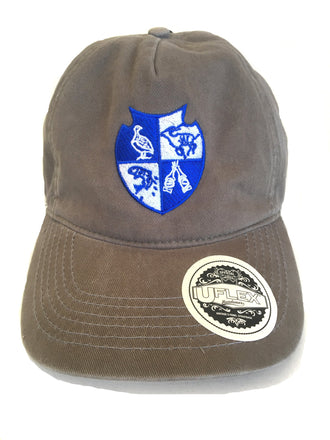
Compare the starting points: clean edges, readable lettering and simplified shapes make the design easier to interpret. The examples illustrate design choices, not guaranteed stitch results.
Good file quality and stitchable design are different things
A vector logo can still contain text that is too small to embroider. A high-resolution photograph can still contain too much detail. Ask two separate questions:
- Is the reference clear? Can the digitiser identify the intended shapes, colours and lettering?
- Is the design suitable? Will those elements remain distinct at the final embroidery size?
Avoid blurry screenshots, compressed website thumbnails and distorted photographs of a logo where possible. For raster artwork, GetCapped's guidelines recommend at least 300 dpi at the intended artwork size. Changing the dpi setting alone will not restore missing detail in a blurry image.
A vector logo is not an embroidery machine file.
Even excellent artwork still needs digitising before a machine can stitch it.
What is embroidery digitising?
Embroidery digitising converts a logo or design into stitch instructions for an embroidery machine. It determines how the design will be sewn, including stitch types, directions, density and the order in which different elements are embroidered.
An ordinary image tells a computer what your logo looks like. A digitised embroidery file tells a machine how to build that logo with thread.
From artwork to stitches: the six-step process
- Evaluate the design. Check the logo, finished size, cap style and embroidery position.
- Prepare the artwork. Simplify detail, adjust spacing and replace unsuitable effects where necessary.
- Plan the stitch path. Choose the sewing sequence to help control movement and maintain alignment.
- Select stitches and underlay. Combine running, satin and fill stitches, with supporting stitches underneath where needed.
- Allow for fabric movement. Account for the way stitches pull and push the material.
- Preview, test and refine. Review the file and, where required, assess a physical sew-out to identify issues.
Digitising is not simply saving a JPG in another format. Software can assist, but a suitable result depends on how the artwork is interpreted for the material and finished size.
Why is digitising for a cap different from a shirt?
A cap has a curved surface, and many six-panel caps have a centre seam. Reinforcement, fabric movement and the seam can affect how small text and delicate details stitch. A file prepared for a flat shirt may need adapting for a cap.
Structured and unstructured caps can both be embroidered, but they do not behave identically. The chosen cap is part of the design decision, not an afterthought.
How to prepare your logo for GetCapped
Send your best artwork together with the cap style and intended logo placement. That gives us the context needed to assess the design.
- Artwork: the original vector file, or your clearest available image.
- Cap style: the cap you are considering.
- Placement: front, side or back.
- Size: preferred dimensions, if known.
- Colours: clearly defined logo colours and any matching requirements.
- Background: identify areas that should remain unstitched. A white background in your file does not automatically mean white embroidery.
- Essential details: tell us which wording or symbols must be retained if simplification is needed.
GetCapped's stated logo colour limit is nine colours. Thread comes in specific shades, so screen colours and finished embroidery may not match exactly.
What if your logo is too complicated?
It may only need a small change: removing a tiny slogan, thickening a border, enlarging the company name or replacing shading with solid colours. For detailed brand identities, a separate embroidery-friendly version can preserve the recognisable name and emblem without forcing every printed detail onto a cap.
Before a large order, know what you are approving.
A digital preview helps explain the layout, but it is not a physical embroidery sample. If you need to assess the stitched result, ask GetCapped about a paid sample order.
Your questions, answered
Cap embroidery and digitising FAQs
Quick answers to help you get your artwork ready for thread.
01 / LOGO SUITABILITY
Can any logo be embroidered on a cap?
Not exactly as supplied in every case. Logos with clear shapes and readable lettering are generally suitable for assessment. Photographs, tiny text, fine outlines and shaded effects may need simplifying.
02 / ARTWORK FILES
Do PNG, JPG and PDF files need digitising?
Yes. Those files can provide artwork references, but they do not automatically contain the stitch instructions required by an embroidery machine. A vector PDF still needs digitising.
03 / PHOTOGRAPHS & DETAIL
Can a photograph be embroidered onto a cap?
Standard cap embroidery does not reproduce a photograph with print-like detail and colour accuracy. A photograph can sometimes be used as a reference for a simplified embroidered illustration.
04 / RAISED EMBROIDERY
Can my logo use 3D puff embroidery?
Possibly. 3D puff uses foam beneath the stitches to create a raised effect and generally suits thick lettering and simple shapes. Thin lines and intricate detail are usually unsuitable. Ask us to assess availability and suitability for your design and selected cap.
05 / REPEAT ORDERS
Will I pay for digitising again on a repeat order?
GetCapped keeps previously digitised artwork on file. Under our stated policy, the digitising fee is not charged again when the existing artwork is reused. Changes to the design or its requirements may need separate assessment.
06 / THE FINISHED RESULT
Will embroidery look identical to my screen artwork?
No, not in every detail. Thread adds texture, colours can differ from screen displays and small elements may need adjusting. The aim is a clear, recognisable embroidered version of your logo.
Ready to check your logo for cap embroidery?
Send your logo, preferred cap style and embroidery requirements to sales@getcapped.co.za.
We can advise on the artwork, size and placement, and explain which adjustments may improve the finished result before you move ahead.
Your cap. Your design. A logo made to work in thread.